
AI studio for wedding photographers

From thousands of frames to the final album, in your style

Cull. Curate. Deliver.

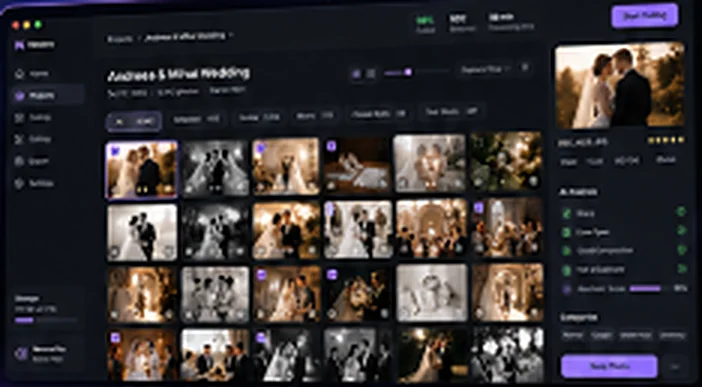
Pixmora picks the best photos, edits them the way you do in Lightroom, retouches portraits and lays out the album. All on your own computer, no uploads.

Download for WindowsPixmoraSetup.exe · 64-bit macOS (.dmg)Apple Silicon and IntelSoon
7 days free No card needed Windows 10 and 11

Reads RAW files straight from

NikonCanonSonyFujifilmPanasonicDNG · JPEG Works with Lightroom
One app, the whole workflow

Everything after the wedding, done in hours, not days

Four modules that work together, from the memory card to the album sent to print.

PIXMORA AI

Smart photo selection and editing

Picks the best frames out of thousands and edits them in your own style, learned from Lightroom.

  • Groups similar frames and catches closed eyes or blur
  • Consistent exposure, white balance and color, in your style
  • Ratings, labels and edits straight into Lightroom
PIXMORA Retouch

Professional retouching

Skin, eyes and teeth retouched naturally, on every frame of the same person.

  • Smoothing that keeps skin texture
  • Brighter eyes, whiter teeth, softer dark circles
  • Adjustable strength for each person

PIXMORA Albums

Album design

The album lays itself out from the best frames, following the moments of the day.

  • Spread layouts that are easy to rearrange
  • Chronological order and balanced color
  • JPEG or PDF export at your print lab's size

PIXMORA Studio

Photo products and presentations

Turns your chosen frames into photo products and presentations for your clients.

  • Presentations and slideshows for delivery
  • Layouts for prints, wall art and other photo products
  • Export at your photo lab's sizes
Privacy

Runs locally. Your photos never leave your computer.

Your clients' photos stay on your drive. Pixmora uploads nothing to the cloud, never waits on uploads and has no frame limits: all the work runs on your own CPU and graphics card.

Zero uploadsYour frames, catalogs and style never reach any server.
Works offlineInternet is only needed to activate and for a quick license check. You can work up to 30 days offline.
No queues, no limitsNo credits and no per-photo fees: process as many weddings as you like.
Workflow

From import to delivery, without switching apps

Pixmora handles the repetitive part. You keep the creative decisions.

Import

Pick the folder with your RAW files or your Lightroom catalog.

Culling

The AI keeps the best frames and drops the misses.

Edit

Your style, applied consistently across the whole wedding.

Retouch

Clean portraits that still look natural.

Deliver

Export to Lightroom, final JPEGs and a print-ready album.

Download

Windows today, Mac coming soon

Install, open and start your 7-day trial: every Pro module on day one, then PIXMORA AI selection.

Windows

Windows 10 or 11, 64-bit. A classic installer that is done in seconds.

Download PixmoraSetup.exe

Latest version

macOS Soon

A native app for Apple Silicon (M1–M4) and Intel, macOS 12 or later.

Tell me when it's out

The same license will work on Mac too.

System requirements

System
Windows 10 or 11, 64-bit
Processor
4 cores (Intel Core i5 / AMD Ryzen 5 or newer)
Memory
8 GB RAM minimum, 16 GB recommended
Graphics
Optional; any DirectX 12 card (NVIDIA, AMD, Intel) speeds up analysis
Disk
3 GB for the app + room for previews
Display
1280 × 720 or larger
Internet
Only to activate and for the periodic license check
Pricing

Simple monthly plans, no surprises

Start with 7 free days: every Pro module on day one, then AI selection. Pick a plan only if Pixmora helps you.

Start

For fast culling after every event

€3/ month
  • PIXMORA AI: full selection (culling)
  • Similar-frame grouping, closed-eye and blur detection
  • Star ratings and labels to Lightroom
  • 1 computer
  • AI editing and PIXMORA Retouch
  • PIXMORA Albums and Studio
Most popular

Pro

For photographers who edit their own work

€6/ month
  • Everything in Start
  • PIXMORA AI: editing in your style
  • PIXMORA Retouch: professional retouching
  • 2 computers (e.g. desktop + laptop)
  • Email support
  • PIXMORA Albums and Studio

Studio

For studios with a team and albums

€10/ month
  • Everything in Pro
  • PIXMORA Albums: print-ready album design
  • PIXMORA Studio: photo products and presentations
  • 3 computers (you, second shooter, editor)
  • Priority support
7 days free, no card Cancel anytime, no minimum term Pay by bank transfer with an invoice; card payments are coming soon

Made by wedding photographers, for wedding photographers

Pixmora grew out of our own workflow at FainNstudio: weekends with thousands of frames, the same corrections over and over, and albums that had to ship on time. We built the tool we wanted, and we improve it every season.

Frequently asked questions

Quick answers

Are my photos uploaded anywhere?

No. All analysis, editing and export happen on your computer. Our server only sees license data: the key, an anonymous computer ID and the app version.

Do I need internet to work?

Only to activate and now and then for a quick license check. The app keeps working for up to 30 days offline, for example when you edit on the road.

How does it work with Lightroom?

Pixmora reads your Lightroom catalogs and files to learn your editing style. Results (stars, labels, edits) are written to XMP files that Lightroom picks up directly, so your workflow stays the same.

Which cameras and formats are supported?

RAW from Nikon (NEF), Canon (CR2, CR3), Sony (ARW), Fujifilm (RAF), Panasonic, Olympus and other brands, plus DNG, JPEG and TIFF.

What does the trial include, and what comes next?

The trial lasts 7 days per computer. On day one you get every Pro module (PIXMORA AI with editing and PIXMORA Retouch), then PIXMORA AI selection until day 7. At the end of day one the app does a quick online check.

After the trial the app asks for a license key. Choose a plan and, once paid, the key arrives by email automatically. Your projects stay exactly as you left them.

Can I use the license on several computers?

Yes: Start on 1 computer, Pro on 2, Studio on 3. When you change computers, deactivate the license in the app (Pixmora → License) and activate it on the new one.

Can I cancel?

Anytime, with no minimum term. Your plan stays active until the end of the paid month and then simply isn't renewed.

When is the Mac version coming?

We're working on it. Leave your address in the contact form and we'll write when it's ready. Your license will work on Mac too, within your plan's computer limit.

How do I pay and get an invoice?

For now, payment is by bank transfer: choose a plan, fill in the form and we email you the invoice and your license key. Online card payment is coming soon.

Ready for the next wedding?

Download Pixmora today

Try Pixmora free for 7 days on your own photos, with every Pro module on day one.

No card neededRuns locallyCancel anytime
Contact

Let's talk

Questions about Pixmora, want a demo or a quote for your studio? Write to us and we'll reply within one business day.

office@pixmora.euEmail
We reply in English and RomanianMonday–Friday, 10:00–18:00 (EET)